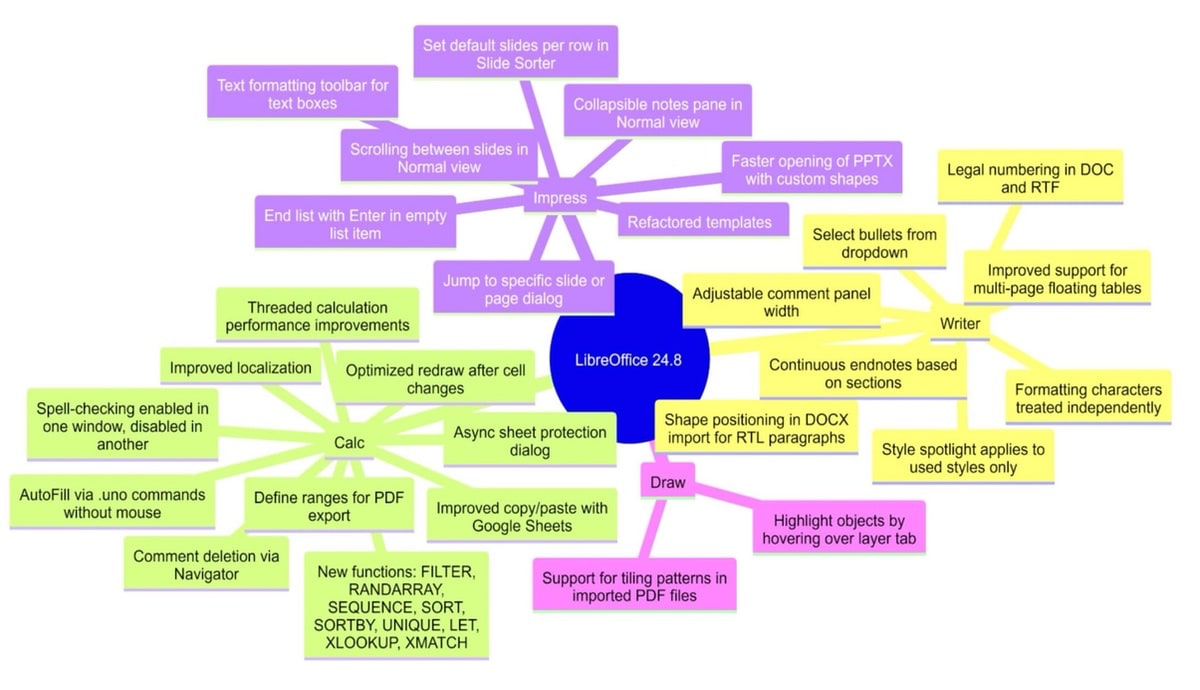
LibreOffice 24.8, die neue Hauptversion der kostenlosen Bürosuite für Windows (Intel, AMD und ARM), macOS (Apple und Intel) und Linux ist ab sofort verfügbar. Dies ist die zweite Hauptversion, die das neue kalenderbasierte Nummerierungsschema (JJ.MM) verwendet, und die erste, die ein offizielles Paket für Windows-PCs mit ARM-Prozessoren bereitstellt.
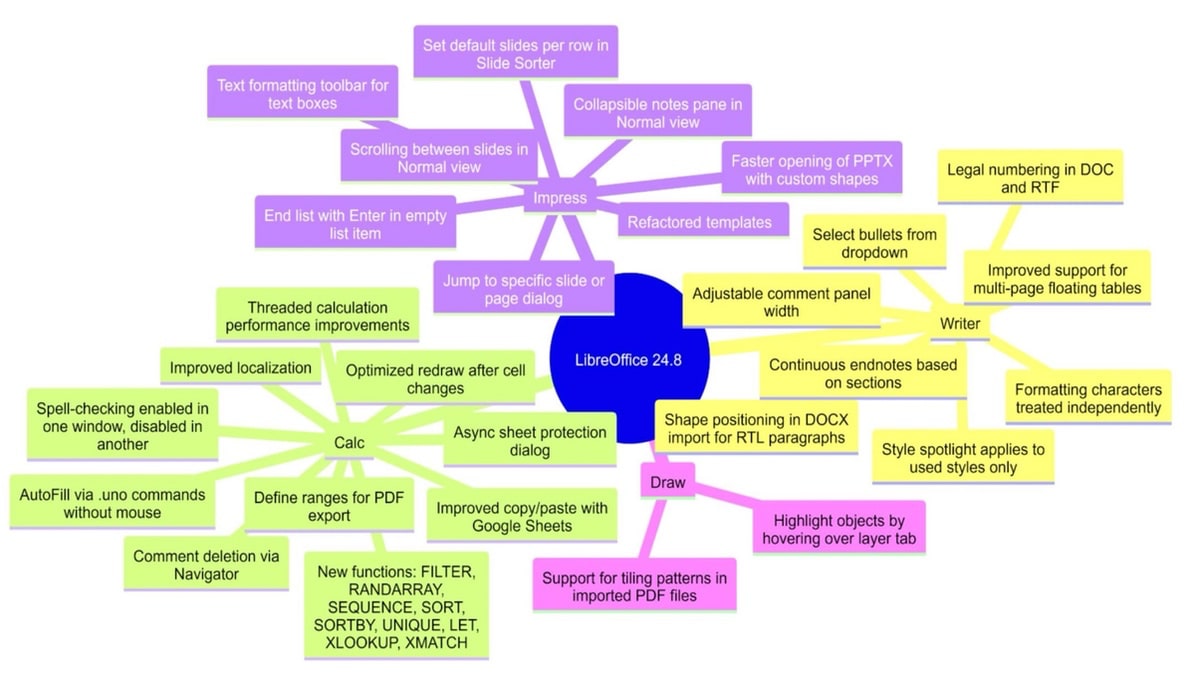
Wer nur gelegentlich eines der Module von LibreOffice nutzt, dem wird vermutlich gar nicht auffallen, wie viel Neues in der Version 24.8 steckt. Das Changelog ist dieses Mal sehr lang, wer die ganzen Funktionen in Aktion sehen möchte, der kann sich alternativ auch dieses Video anschauen:
Änderungsprotokoll LibreOffice 24.8
PRIVACY
- If the option Tools ? Options ? LibreOffice ? Security ? Options ? Remove personal information on saving is enabled, then personal information will not be exported (author names and timestamps, editing duration, printer name and config, document template, author and date for comments and tracked changes)
WRITER
- UI: handling of formatting characters, width of comments panel, selection of bullets, new dialog for hyperlinks, new Find deck in the sidebar
- Navigator: adding cross-references by drag-and-drop items, deleting footnotes and endnotes, indicating images with broken links
- Hyphenation: exclude words from hyphenation with new contextual menu and visualization, new hyphenation across columns, pages or spreads, hyphenation between constituents of a compound word
CALC
- Addition of FILTER, LET, RANDARRAY, SEQUENCE, SORT, SORTBY, UNIQUE, XLOOKUP and XMATCH functions
- Improvement of threaded calculation performance, optimization of redraw after a cell change by minimizing the area that needs to be refreshed
- Cell focus rectangle moved apart from cell content
- Comments can be edited and deleted from the Navigator’s right-click menu
IMPRESS & DRAW
- In Normal view, it is now possible to scroll between slides, and the Notes are available as a collapsible pane under the slide
- By default, the running Slideshow is now immediately updated when applying changes in EditView or in PresenterConsole, even on different Screens
CHART
- New chart types “Pie-of-Pie” and “Bar-of-Pie” break down a slice of a pie as a pie or bar sub-chart respectively (this also enables import of such charts from OOXML files created with Microsoft Office)
- Text inside chart’s titles, text boxes and shapes (and parts thereof) can now be formatted using the Character dialog
ACCESSIBILITY
- Several improvements to the management of formatting options, which can be now announced properly by screen readers
SECURITY
- New mode of password-based ODF encryption
INTEROPERABILITY
- Support importing and exporting OOXML pivot table (cell) format definitions
- PPTX files with heavy use of custom shapes now open faster
Angebot

Angebot

Transparenz: In diesem Artikel sind Partnerlinks enthalten. Durch einen Klick darauf gelangt ihr direkt zum Anbieter. Solltet ihr euch dort für einen Kauf entscheiden, erhalten wir eine kleine Provision. Für euch ändert sich am Preis nichts. Partnerlinks haben keinerlei Einfluss auf unsere Berichterstattung.